With Process Lines you can connect machinery that are on board together in the same operation process. Like that it is possible to filter for equipment that is not running and on that you can carry out overhauls. The function is made for large numbers of equipment connected together. On many vessels there may be no such process lines and no need to use this function.
|
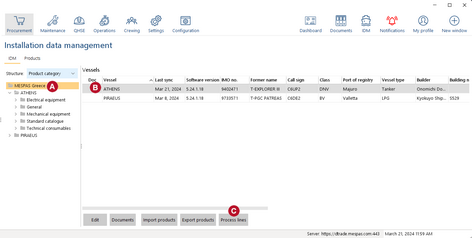
1.Go to "IDM" 2.Click on your Company name at the top of left side tree 3.Select a vessel in the main screen 4.Click on "Process lines" |


Add new Process line
|
1.Click on "Add". 2.Enter a name for the new process line 3.Click on "Save" |

Assign a product to a Process line
|
1.Select a Process Line in the Screen shown above. 2.Click on "Edit". Now you see all products that are assign to the respective Process Line. 3.Click on "Add" 4.A window pops-up which shows the data tree of your vessel. 5.Navigate to the product you want to assign to this Process line 6.Click on "OK" 7.Click on "Save"
You can also select a Process Line in the Detail Screen of a Product in IDM. See in Jobs to do how to filter for Process Lines in PMS. |

