|
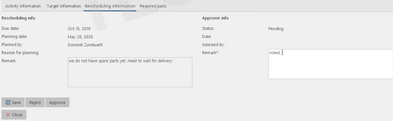
To accept or reject a new planning date, click on "Details" and open the tab "Rescheduling information". Click on "Approve" or "Reject" and enter in the field "Remark" the reason for your decision or further instruction for the vessel. |
|
You may use a barcode scanner to scan the code on a job card or on the "jobs to do report" and automatically open the relevant job. The detailed instruction on how to do this depends on the scanner model you use. For guidance on how to implement barcode scanning into the Stock Management, Planned Maintenance and Tasks of MESPAS TSM please contact MESPAS . |
