In MESPAS TSM there are drop-down menus in which the content differs from customer to customer. This content is editable in the tab "Drop-down menu settings". In order to be able to access this screen, your login needs to have the role "Company administration".
|
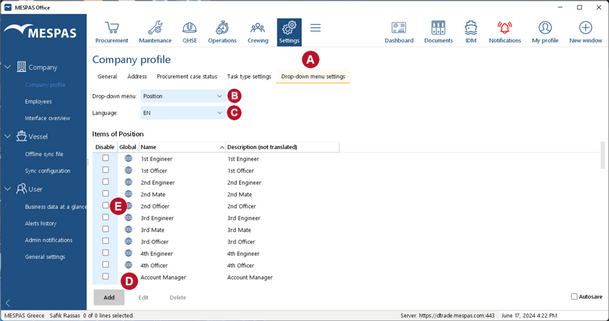
1.Open the Menu "Settings" > "Company profile" 2.Click on "Drop-down menu settings" 3.Choose the drop-down that you like to edit •Payment terms (in Procurement: time for payment of orders) •Commission type (in manage suppliers: for user of budgeting-export only) •Department (in Admin employees and My user profile) •Position (in Admin employees and My user profile)
4.Leave the Language setting on "en" for English 5.You can now add, edit or delete a company specific item of a drop-down list 6.You can not edit global drop-down list items (marked with |
|
6.Each field in a drop-down has a Name and a Description. The field Description is only shown in this screen "Drop-down menu settings".
7.To add a new field to a drop-down click on Add |
 .
. .
. .
. .
. 

