The date when a maintenance activity has to be executed depends on the interval entered in the PMS settings. These intervals may be calendar time (i.e. days, weeks etc.) or running hours based or both.
|
If a maintenance activity has a calendar time based and a running hours based interval, two hypothetical dates are calculated but only the earlier one is used as due date. |

In the column Interval on the Jobs to do screen the interval is shown that is effectively used to calculate the due date (the earlier date if there is a calendar based and running hour based interval).
On the Screen Job overview both intervals are shown in separate columns.
Calendar time based due date calculation
The calculation of a calendar time based due date is quite simple: the interval is added to the date of the last execution of a maintenance activity (e.g. 15. April 2016 + 30 days = 15. May 2016).
Running hours based due date calculation
The calculation of a running hours based due date is a little more complicated, as it depends on how often the corresponding machinery is effectively used. The system calculates a due date for each activity based on the last four running hour recordings of an equipment in the past.
This is done with the method of least squares (developed by Carl Friedrich Gauss) as this is specifically designed to minimize the error of any approximation. The method of least squares is a standard approach to the approximate solution of over-determined systems, i.e. sets of equations in which there are more equations than unknowns. "Least squares" means that the overall solution minimizes the sum of the squares of the errors made in solving every single equation.
Example of fitting a set of data points with a linear function:

In MESPAS TSM, we approximate the next due date using a linear approximation function f(x) =a0 + a1*x
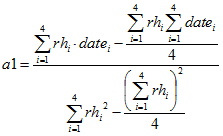
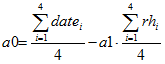
Using the method of least squares we approximate a0 and a1 given existing running hour data (rh1/date1, rh2/date2, rh3/date3, rh4/date4) as follows:
sumxy = rh1*date1 + rh2*date2 + rh3*date3 + rh4*date4
sumxx = rh12 + rh22 + rh32 + rh42
avgx = (rh1+rh2+rh3+rh4) / 4
avgy = (date1+date2+date3+date4)/4
a1 = (sumxy - 4*avgx*avgy / (sumxx - avgx2*4)
a0 = avgy - a1*avgx
The formula of a.m. calculation is as follows:
|
If there are no running hours recorded for an equipment the system is not able to calculate a due date and will set automatically 31.12.9999. |