Create budgets and edit budgeting figures

Top  Previous  Next

budgeting_0

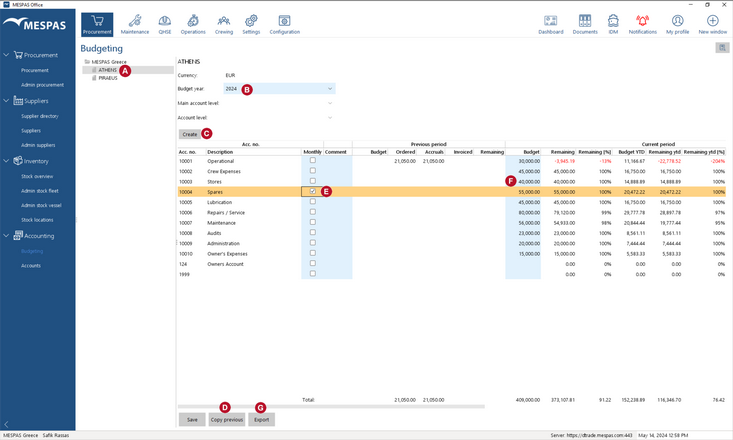
1.Go to menu "Procurement > Budgeting".

2.ball_A_t Select a vessel in the data tree.


ball_B_t Select an existing budget year from the drop-down list "Budget Year" or
 

ball_C_t create a new fresh budget year by clicking "Create".


For every new budget year an own currency can be chosen for the individual vessel.


ball_D_t Create a new budget year based on the previous budget year by clicking "Copy Previous".
 

ball_E_t Set up an account for monthly budgeting by checking "Monthly".
 

ball_F_t Edit monthly or yearly budget figures within table.

ball_G_t You may export budgeting data by clicking "Export". The data is saved as a .csv (comma separated values), which may be opened in Excel or any text editor. Make sure to add the ending ".csv" when choosing a file name, e.g. "myBudgetingData.csv".

Explanations of columns

Budget

Budget ytd

Remaining

Remaining [%]

Remaining ytd

Remaining ytd [%]

Entered by buyer user

In case of yearly budgets:

= Budget / 365 * Days_since_budget_start
 

In case of monthly budgets:

= (BudgetCurrent Month / 30 * DayCurrent Month ) + SUM(BudgetsMonthlySinceStart)

= Budget - (Accruals + Invoiced)

= Remaining / Budget * 100

= Budget_ytd - (Accruals + Invoiced)

= Remaining_ytd / Budget_ytd * 100

Orders

Accruals

Invoiced

Sum of all order amounts by account entered by buyer user or supplier

= Orders - Invoiced

Sum of all order invoices amounts by account entered by buyer user

How do account accruals get calculated?

Accruals are always adjusted in the account on which a corresponding order was booked!

For a single order, you may book multiple invoices across several accounts and in several currencies. In such a case it is important to understand how accruals for the accounts involved get calculated/adjusted. Please consider the following example:

Step

User action

Account 4350

Account 4400

Order

Accruals

Invoiced

Order

Accruals

Invoiced

1

An order gets booked on "account 4350" with an amount of $100.

$100


2

"Invoice A" for €25 gets booked for that order on "account 4350".


$100 - $22 = $78

$22 A)


3

"Invoice B" for £34 gets booked for that order on another
"account 4400".

Note that the accruals are adjusted in the account on which the corresponding order was originally booked!


$78 - $45 = $33


$45 B)

A) €25 equals $22
B) £34 equals $45

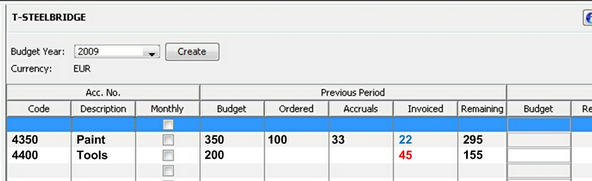
The above example as seen in the screen
budgeting_explanation_0