The Barcode/QR-Code function allows you to update your inventory on board or to create an annual stock-take easy and efficient. You can print barcode stickers for each type of part and use them to label your shelves and boxes. When parts are added or removed from stock, you just have to scan the code and enter the amount of parts.
To use the barcode function you need to have a barcode printer and a barcode scanner. If you plan to introduce barcode scanning for the first time in your company, you may contact your project manager at MESPAS for advise.
Print QR-Code labels
|
1.Go to menu "Stock" > "Stock overview".
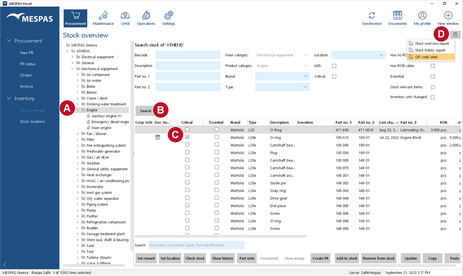
2.Select any level in the data tree (from company to product type) 3. Click on "Search". 4.Select a part •If you want to select several parts, select/deselect them by mouse-click while holding down Ctrl. •If you want to select several parts in a row, select/deselect them by mouse-click while holding down Shift. •If you want to print barcodes for all parts in a list, make sure you have at least one part selected and click Ctrl+A. 5.Click on the report icon 6.A window with a drop down field appears. Select "PDF" and click ok.
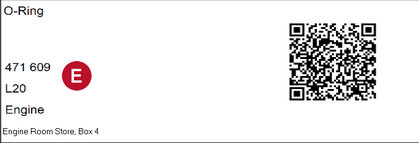
7.Print the PDF file with the barcode stickers on your barcode printer. •All data written into the barcode is also printed as text on the left side of the label. 8.Stick the barcode labels always on plane and smooth surfaces. |


Update your stock with a barcode scanner
The stock update procedure depends on the rights/roles that are assigned to your user. If you just do stock control, the barcode scanner will open a window to add or remove parts. If you are the store keeper, the scanner will open the update stock dialogue to enter a new ROB value.
|
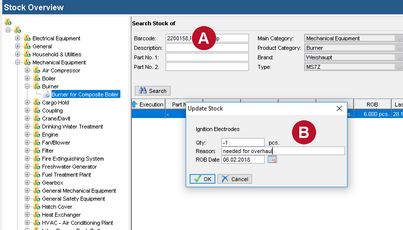
1.Go to menu "Stock" > "Stock overview". 2.Click in the filed "Barcode" . 3.Use your barcode scanner to scan a QR-Code and identify a type of part that you are adding or removing from your stock. 4.A window pops up to enter the change in stock and a reason for this change. 5.Enter the amount you add to or remove from stock. To remove parts from stock, enter "-" before the value, to add parts just enter the figure (e.g. -5 to remove five items; 5 to add five items). 6.Click "OK" or the Enter key.
|