Manage available stock/inventory locations

Top  Previous  Next

Part stock locations are selected from a customized list managed on board of the vessel. To be able to add, edit or delete these locations

your user must have the user role "offshore-stock-admin".

manageInventoryLocations_0

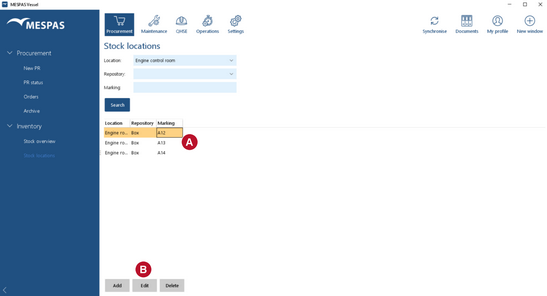
1.Go to menu "Procurement" > "Stock locations".

About listing stock locations: ball_A_t
 
To list all existing inventory locations, leave all fields empty and click "Search".
 
To list all inventory locations of a certain repository type, select the repository type from the drop-down list and click "Search".
 
To list all inventory locations of a certain marking, type any part of the marking and click "Search".
 

To "Add", "Edit" or "Delete" inventory locations, select an existing inventory location, click the corresponding button and enter the required data. ball_B_t