Update MESPAS Cube
1.Load the sync file on any PC where MESPAS TSM is installed and running. 2.The system now requires to restart. Click "OK"
|


Update the MESPAS TSMsoftware
|
1.Start the MESPAS TSM client on your PC.
2.The system automatically asks you to install the new software update. Click "Install" and wait until the first part of the update has terminated successfully.
3.After the first part of the software update has terminated successfully, the client asks you to restart the application. Click “Restart” and wait again.
|
||
|
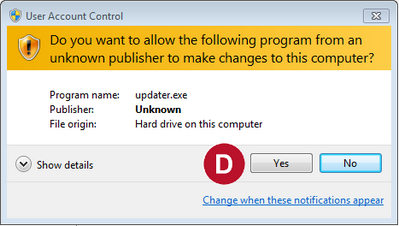
4.Confirm the User Account Control dialogue by clicking “Yes” 5.You have now successfully updated the MESPAS TSM client Application. |

 and wait until the MESPAS TSM client restarts automatically.