A supplier may confirm or reject any order you have sent. If the supplier uses the MESPAS Supplier Business Management solution or an interface to link his own application to the MESPAS server, this information will automatically be available in your MESPAS Procurement Process Management. If orders are rejected by a supplier, the respective option "Handle order rejection" is available in the section "My filters". However, there may be suppliers, that do not have any connection to the MESPAS database and with whom you communicate solely outside the MESPAS Supply Chain (e.g. by email, phone etc.). In this case you may enter yourself the confirmation or rejection of an order on behalf of the supplier into MESPAS Technical Ship Management. |
|
|
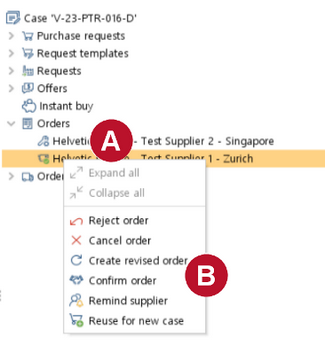
1.Go to menu "Procurement" > "Procurement". 2.Right click on the respective order 3.Select "Reject order" or "Confirm order"
|
|
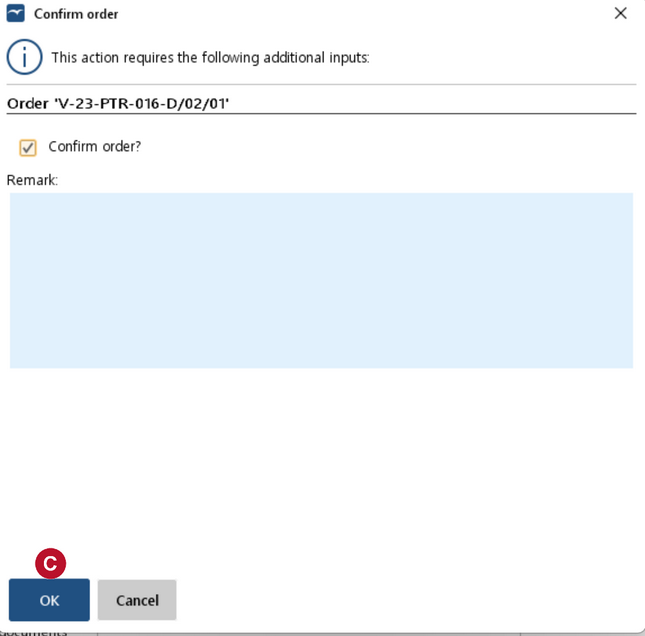
4.You may enter a remark. 5.Click on "OK" |
 .
.
 .
.