|
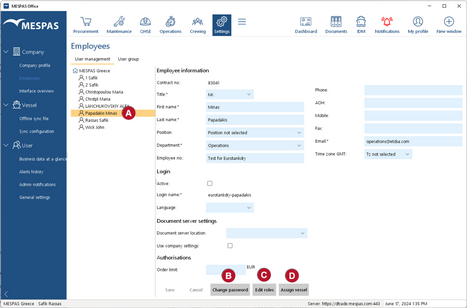
1.Log in as Company Administrator. 2.Click menu Settings > Employees. 3.Select a user name in the list to the left •To change the password for that user, click Change password •To edit the roles assigned to that user, click Edit roles •To assign vessesls to the user, click Assign vessel
Changed settings will become active with the next login of the respective user. |
|
Edit Roles To assign user roles to an individual user you have to have the privilege of a company administrator. This role can only be assigned by MESPAS and must be mutually agreed within your organization. Once you have selected a user and click "Edit roles" you may: 1.Select one or many user groups defined in User group section 2.The roles then will be applied automatically as defined in the User group section. You can see the Grey tick marks indicating the user group roles. NOTE: If you select more than one user group the combination of both roles will be applied. For example you select Superintendent and Purchaser user group, then all roles from Superintendent and Purchaser group will be applied complementarily. 3.The role name indicates the functional scope for this role. 4.The Role description gives more insights in what this user role exactly can be used for. 5.You may add additional roles to this user which are not given from the User group roles. those roles are indicated with a blue box mark. 6.Alternatively you may "Select all" or 7."Deselect all" to remove all roles 8.Once the roles are correctly applied, press "OK".
|
|
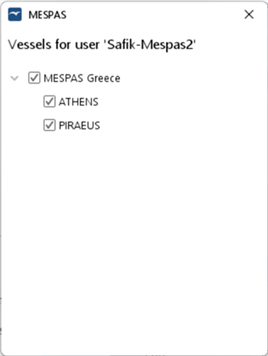
In case you click Assign vessel, you can now select one/many or all ships for a certain user. This user is then only capable to view objects in the context of the selected vessels. |
 .
.