General company information
|
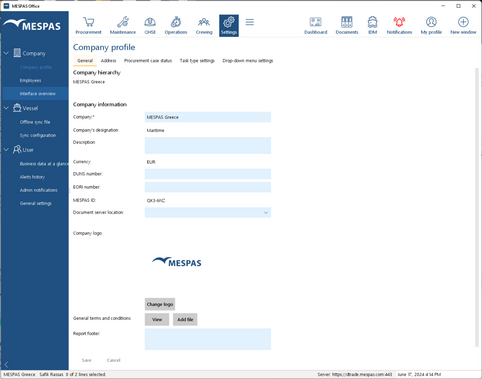
1.Go to menu "Settings > Company profile". 2.Select tab "General". 3.Enter or edit your company details. Document Server In order to improve the performance of the software, MESPAS has special servers for documents in Europe and Asia. Depending on where you are located documents will load faster depending on the server selection. Documents are always uploaded on the server in Zurich and directly copied to the server in Hong Kong. The content of both document servers is always the same. The document server can be selected by the company administrator for all employees or by each user in My Address. If the field "Address of document server" is empty, the standard server in Zurich is used. 4.Select "Asia" in the respective drop down field. 5.Click "Save". Upload your Company Logo If you upload your company logo it will be on your Purchase Requests, Orders and reports. For the best result please upload a picture of the type .gif or .jpg with a maximal width of 300px and maximal height of 75px. |
Company address
|
1.Go to menu "Settings > Company profile". 2.Select tab "Address". 3.Enter or edit your company address. |
