You may attach a creditor number, a credit note accounting code and your customer number to a supplier company.
|
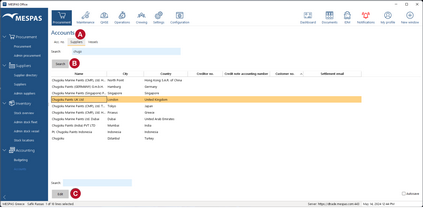
1.Go to menu "Procurement" > "Accounts". 2.Select tab "Suppliers" 3.Enter a supplier name or city and click on "Search" 4.Click on "Edit" 5.Enter a creditor number, a credit note accounting code, your customer number and a settlement email. The settlement email is used for an accounting interface. 6.Click "Save" when finished.
|
 .
. .
.
