Manage vessel crew profiles (primary functions)

Top  Previous  Next

crewManagement_0

1.Go to menu "Crewing > Crew management".

2.Select a vessel in the data tree. ball_A_t

3.Select the vessel itself and click "Crew Profile" ball_B_t to edit the selected vessel's crew profile.

4.You may now: (See below)
 
- Add new functions to the crew profile.
- View/edit existing functions
- Delete existing functions

Add, view and edit functions

crewing_crewProfile_Details_3

1.Click "Add" or select an existing function an click "Details".

crewing_crewProfile_Details_0

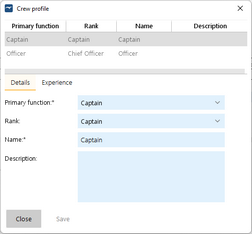
2.Select tab "Details" and enter the function's details. Click  "Save".

crewing_crewProfile_Experience_0

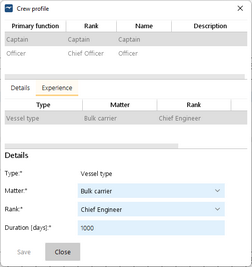
3.Select tab "Experience" ball_C_t and
 
- select an existing experience and click "Edit" to edit it or
- select a new experience from "Add Experience:" ball_D_t to add a new experience or
- select an existing experience and click "Delete" to delete it.


crewing_crewProfile_Experience_1

4.Edit the experience and click "Save".