Parts are used in Procurement, in Stock Management and even in PMS, when jobs are set on part level.
There are global parts, entered by MESPAS for all products of a product type and company specific parts, entered in office or on a vessel. You may add, edit or delete the company specific parts, while the global parts are ineditable and may only be removed using the applies ticker. Company specific parts are marked with  in a column in the parts window (CoSp).
|
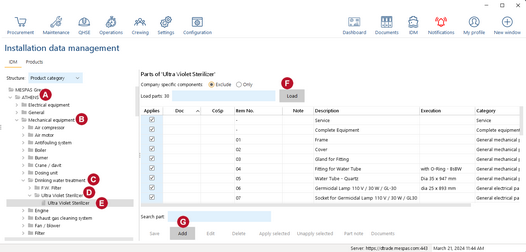
1.Go to "IDM". 2.In the tree, select the vessel 3.In the tree, select the main category 4.In the tree, select the product category 5.In the tree, select the product label 6.In the tree, select the part level 7.Click on "Load"
8.Also you may exclude/include "Company specific components" by selecting the corresponding radio buttons "Exclude" or "Only" 9.Click "Add" |


|
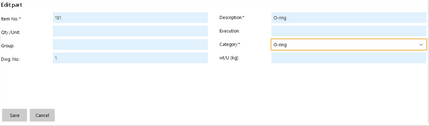
9.Fill in the details. The fields can vary depending on the product category and brand. 10. Click "Save". |
||||
|
|||||
|
Best Practice: The parts entered in office or on the vessel apply only on the product where they were entered. If you want them to apply on other products of the same type (on the same or other vessels) you have to use the applies tickers. |
