Related devices are products that belong to another product and are normally integrated in it (e.g. Electro motor in a pump). They are shown twice in the IDM tree, once in the product category that they belong to (e.g. Electro motors) and once at the product where they are attached to (e.g. Ballast Pump #1).
You may add a new related device or define an already entered product as related device.
Add a new related device or edit an existing related device
|
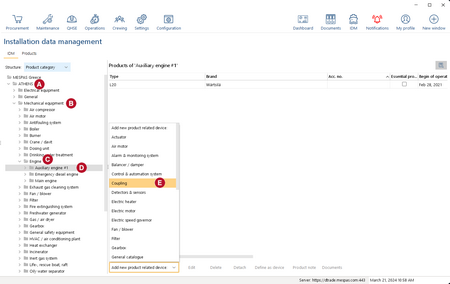
1.Go to "IDM". 2.In the tree, select the vessel 3.In the tree, select the main category 4.In the tree, select the product category 5.In the tree, select the product 6.To ADD a new related device, select it from the drop-down list 7.Fill in the details. For explanation and remarks about the details please check above "Add or edit product". 8.Click "Save". |


 .
.