|
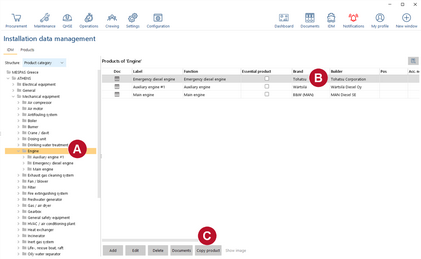
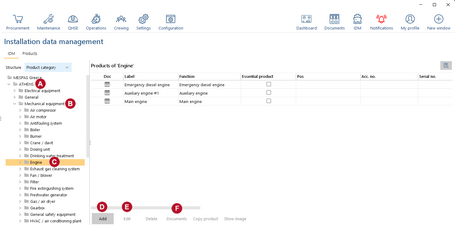
1.Go to "IDM". 2.In the tree, select the vessel 3.In the tree, select the main category 4.In the tree, select the product category 5.To ADD a new product, click "Add"
6.Under "Documents" 7.You may |


|
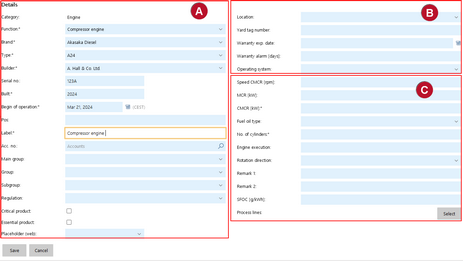
2.Fill in the details. 3.Click "Save". |
||||||||||||||||||
|
|||||||||||||||||||
Copy product
Many types of equipment can be found twice or multiple times on the same vessel or are installed identical on sister vessels. In order to facilitate the data entry of equipment into the Installation Data Management (IDM), products can be copied.
In order to be able to copy IDM products the user needs to have the role "IDM administrator". As copying products does entail some risks for your data structure and should only be done by trained users, this role is distributed by MESPAS only.
|
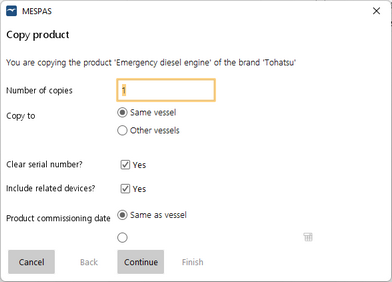
1.Go to "IDM". 2.In the tree, select the vessel, main category and product category 3.In the main window select the original product 4.In the upcoming window you have to choose.. o..how many copies of the selected product you like to have. o..if the copies are to be on the same vessel or on or several other vessels. o..if you like to copy or clear the serial number. o..if related devices are also copied. o..and if the new products begin of operation date is the same as the target vessels commissioning date or if you like to enter a new date.
5.Click on Continue. 6.If you have selected "copy to other vessel" a new window will pop up, where you can select all the vessels to copy the new product(s) to. 7.Click on Continue. 8.A window pops up that shows again the data that will be copied for confirmation. 9.Click on Finish. |