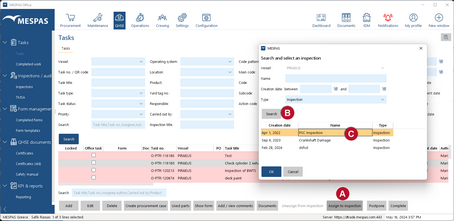
Tasks belonging to a future inspection (e.g. class audit, port state inspection etc.) may be managed, monitored and reported together on the screen inspection report.
|
1.Go to menu "QHSE" > "Tasks". 2.Select a task that is part of an inspection. 3.Click "Assign". 4.Search for the respective inspection 5.Click on "OK". You may any time unassign a task from an inspection by selecting the relevant task and clicking "Unassign". |