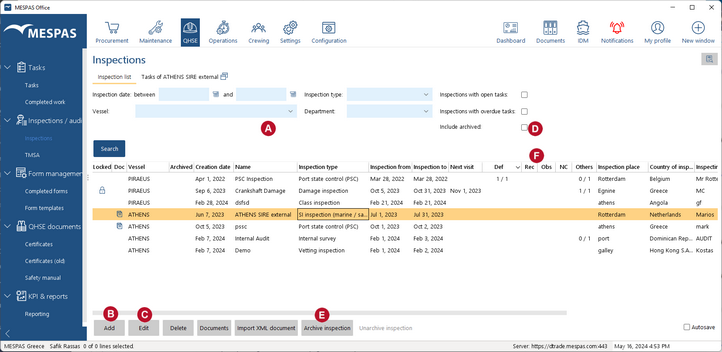
On the screen Inspection report you can enter individual tasks that are grouped to an inspection (e.g. class audit, port state inspection etc.). This allows you to easily manage tasks with reference to an inspection and to present KPI figures required from ISM.
|
1.Go to menu "QHSE" > "Inspection report". 2.Fill in the filter fields to search for an inspection •the field "Outstanding" filters for inspections with open tasks that are not yet overdue. •the field "Overdue "filters for inspections with open, overdue tasks. •if both fields are ticked only inspections with with outstanding and overdue tasks will show up. •Select if "Archived" inspections should appear or not 3...click on "Add" to enter a new inspection
4.Fill in the relevant details to the new inspection. 5.Click on "Save" and "Close". 6.When all relevant data is entered to an inspection click on "Commit". From now on you can not edit the inspection anymore, but they can in office.
7.To modify the inspection record or to add a task to an inspection, select the relevant inspection and click on "Edit"
8.Once an inspection is finished may "archive" this record. You can "Un-archive" it at any time |
||
QHSE indicators: Inspections containing following task types will be aggregated and displayed in the corresponding columns separately •Def : deficiencies •Rec: Recommendations •Obs: Observations •NC: Non-Conformities •Others |
|||
Locked (not editable) inspections: •An inspection is locked on the vessel, when it was entered in office or when it is committed. •An inspection is locked in office, when it was entered on the vessel an the vessel has it not yet committed |
|||
|
|||
|
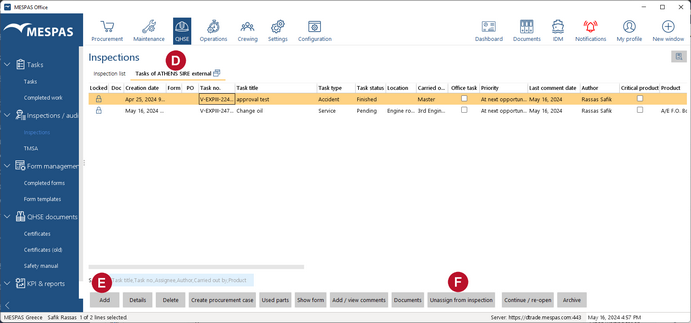
7.Select the tab "Task" 8.Click on "Add" 9.Fill in the Task details. It's the same fields as for any Task and you have the same functions as explained above. 10. You may dissolve the task any time from the inspection with a click on "Unassign from inspection" 11. To assign an already existing Task to an Inspection report, please switch to Tasks screen. 12. To create Inspection reports as required from ISM click on the report icon at the top left as described in chapter Create a report. |
||