 |
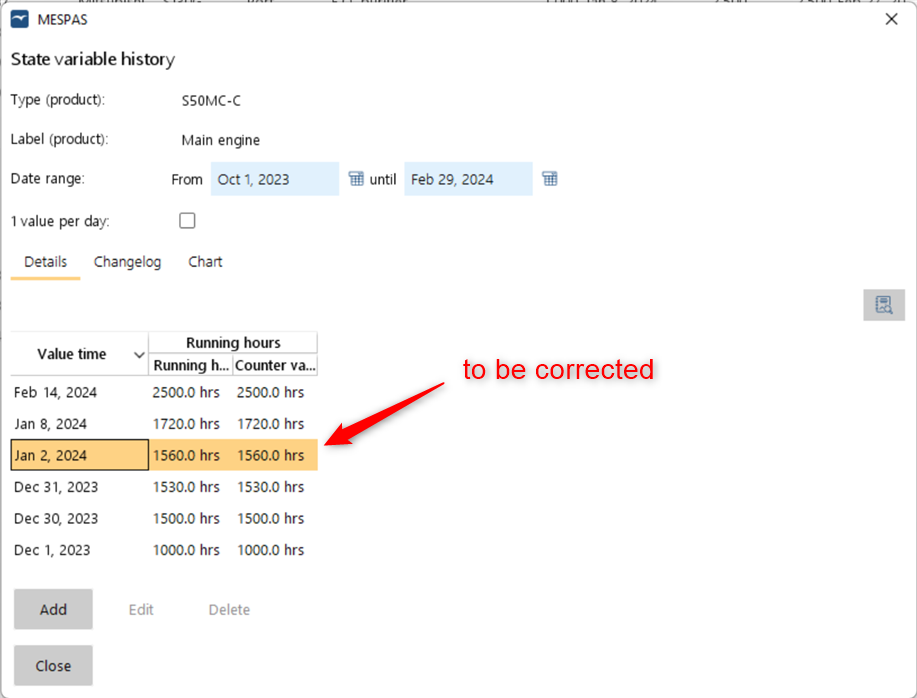
In this example we correct a wrong running hours recording. For this, we open the menu "Maintenance" > "Running hours", select the entry "Main engine" (S50MC-C) and click "State variables" . Currently the compressor has the following running hours history as shown below. Let's assume that the recorded value of 1560 hrs on Jan 2,2024 is wrong and the correct value must be 1600 hrs instead. In MESPAS TSM, you can only edit the latest value (e.g. 2500 hrs on Feb 14,2024). So in order to correct the value from the Jan 2,2024 you need to: 1.take note of all subsequent values up until and including the most recent one (2500 hrs on Feb 14,2024 and 1720 hrs on Jan 8,2024). 2.delete all the values noted in step 1. 3.edit the value 1560 hrs on Jan 2,2024 to 1600 hrs and 4.add again all the values noted in step 1. |
(See Add, edit or delete state variables values for further explanations on adding, editing and deleting)