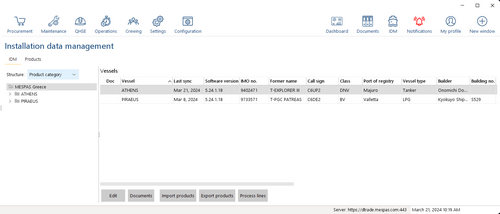
Manage installation details

Top  Previous  Next

IDM_manageInstallationDetails_1

1.Go to "IDM".

2.Click on your company name at the top of the data tree.

3.Select an installation in section "vessels".

4.Click "Edit".


You may view and manage documents assigned to an installation. See Manage Document Assignments.

Explanation and remarks about selected details

Begin of Operation*

Enter the date when the installation/vessel was put into service for your company.


This date is used as the starting date for calendar-based PMS activities assigned to the vessel. (See: Create new product type level MA across fleet)

The default value is the current date.

Vessel Code

Enter the vessel specific identifier which will be used as part of the reference number for procurement cases (PRs, RFQs and Orders).

Acc. No. (Accounting Number)

Each vessel can be set up as a cost unit by specifying a fully customizable ID. To set account codes by vessel go to the Account setting screen.

Invoice address

This field allows to assign the standard invoice address from the list of invoice addresses defined in "My profile" section to each individual vessel. this address is then used in the purchasing module where the invoice address can be specified.