The MESPAS TSM IDM mainly contains physical parts which can be ordered through the procurement module. In many cases however you want to provide a range of services which a vessel can request by committing a purchase request (PR).
There are two different ways to order services in MESPAS TSM:
1. On almost all equipment in MESPAS TSM there is a fictive spare part with the label "Service" added. If the crew uses this part to request a service it has the advantage that all details about the equipment (i.e. Brand, Model, Serial-No. etc.) are automatically on the RFQ sent to the supplier.
2. If you like to order Services under a separate accounting number you can also enter a subcategory "Service" into the IDM tree. That is done by following these steps:
Preparation
|
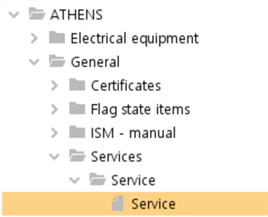
1.Go to "IDM". 2.Select a vessel. 3.If it doesn't exist yet, add the main category "General". 4.If it doesn't exist yet, add the product category "Services". 5.If it doesn't exist yet, add the product "Service" by selecting "Service" as the product's function.
You now have the structure shown on the left. |
Add/edit/delete services
|
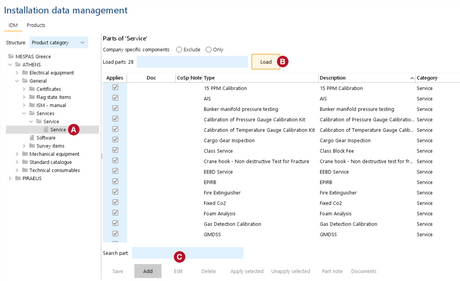
1.Go to "IDM". 2.Expand a vessel. 3.Expand main category "General". 4.Expand product category "Services". 5.Expand product "Service". 6.Select the level "Service" 7.To view existing services, click "Load". 8.To add a new service, click "Add" 9.To edit a service, select the service and click "Edit" 10.To delete a service, select the service and click "Delete" |
 .
.
