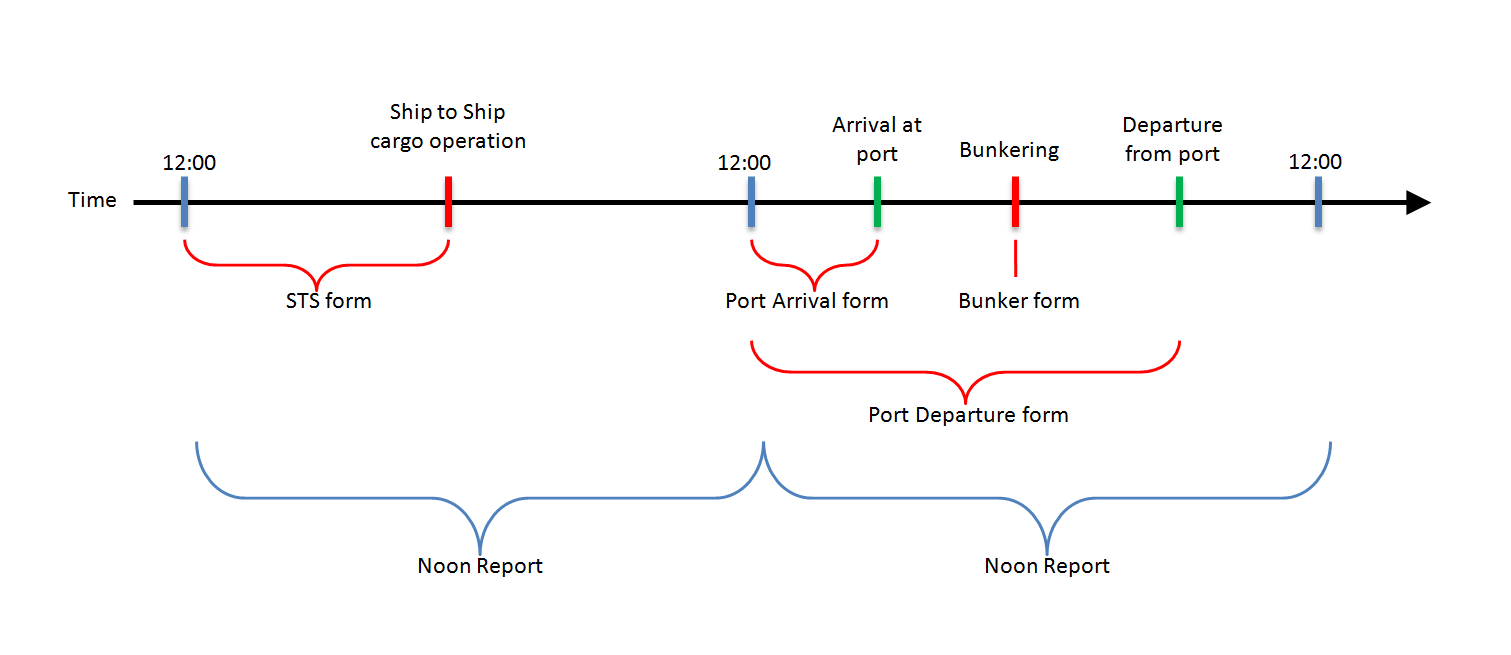
The data needed for MRV and DCS has to be entered on the vessel into the Noon Report and four specific forms of the Form Manager.
Enter MRV and DCS data to Noon Report
|
1.Go to "Operation" -> "Noon Report".
2.Fill in the Noon Report fields daily as described in the chapter Collect Noon Report data. Please be aware that all values entered are from noon to noon. 3.The Noon Report fields required for MRV are ticked in the column "DCS MRV ". Please make sure that you enter the data into all of these fields. 4.Click on "Save"
|


Enter MRV data to forms
1. Go to "QHSE" -> "Form templates". 2.Enter "MRV" into the search field and click on "Search" to filter for the relevant forms. 3.Please consider when each form has to be filled: •IMO DCS & EU MRV Arrival at Berth Form, to be filled: oWhen berthing directly from sea passage oThere is no need to fill in the arrival form during anchor stay
•IMO DCS & EU MRV Departure Form, to be filled: oWhen departing for sea passage oNot to fill for movements within the port limits
•IMO DCS & EU MRV Bunkering Operation Form, always to be filled when bunkering fuel oil, regardless where the bunker operation takes place.
•IMO DCS & EU MRV Ship to Ship Cargo Operation Form, to be filled when Cargo Operations between two vessels take place outside the port limits. Inside port limits cargo transfer does not have to be reported for MRV purpose. 4.Select a form and click on "Fill in form". 5.You may enter a remark into the field "Description" that pops up. Click on "OK". 6.Fill in all mandatory fields of the form.
7.Please see on the below chart the time frame relevant for the data to be entered (e.g. the time frame for F.O. consumption, distance over ground or time spent at anchor). 8.If there was no consumption of a fuel type or if no distance was traveled, do not leave the field empty but enter “0”.
9.Click on "Temporary Save" to save your entries before completing the form and on "Final Save" to transmit the form with your next synchronisation to the office.
|