It may be that an identical or very similar purchase request needs to be done repeatedly (e.g. a monthly provision order). In that case you do not have to enter all requested parts or items again, but you can reuse a purchase request or order that is already in the system. You can reuse and edit any former PR or order and create a new PR out of it.
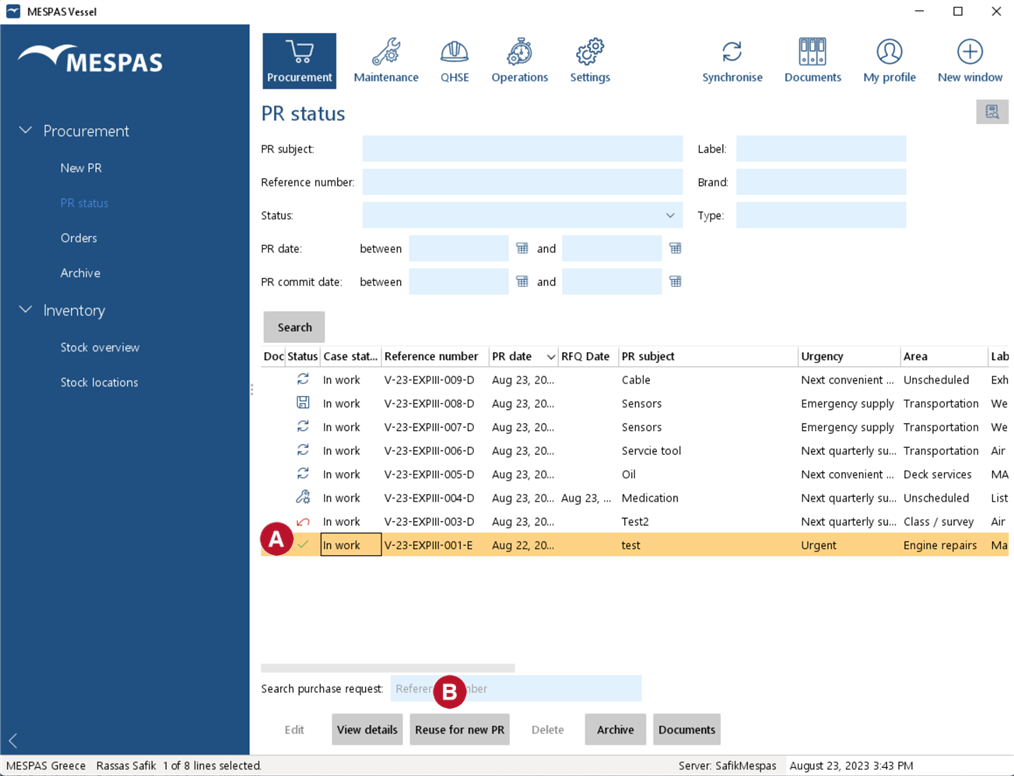 |
1.Go to menu "Procurement" > "PR status" 2.Select the PR or order to reuse 3.Click on "Reuse for new PR" 4.Now you get the screen with the parts/items and quantities initially used. Editing the parts for your PR and sending it works exactly as described above in "Start new PR on vessel". •You can change the quantity of a part/item directly in the column "Qty". •To remove a part/item just give as quantity "0". •To add parts to your purchase request from the system enter part aspects (e.g. name, plate number, etc.), click "Load" and enter the quantity. •To add parts that are not yet in the system click on "Add". 5.Click on "Continue". 6.Add information/details about the purchase request.
7. Click on "Commit" or "Save".
•Committed PRs are synchronised to the office and archived. •Saved PRs are NOT synchronised to the office and can be edited again. |

