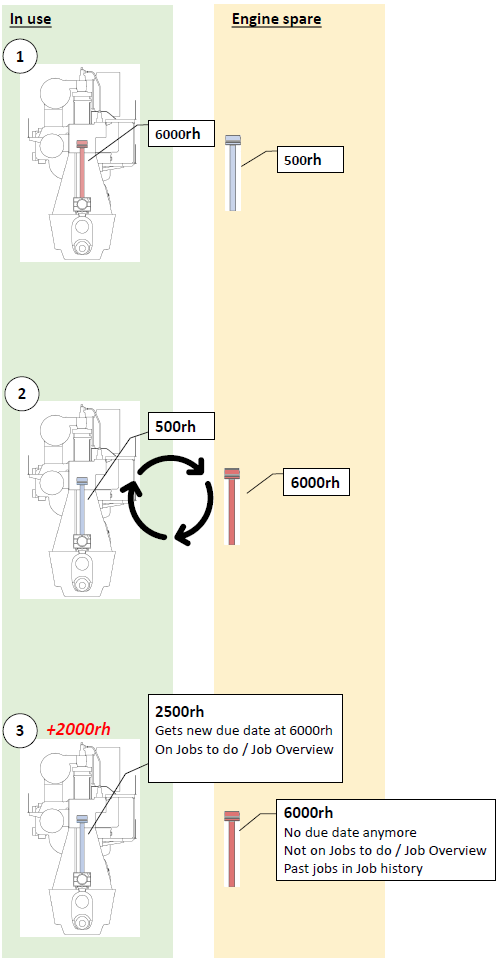
Example: Piston and Rod Overhaul all 6000rh
|
On the instance removed, running hours counting will stop. On the newly installed instance, running hours counting will restart at it's current value and maintenance activities on this part will become due correspondingly. Example: 1.The red piston and piston rod that is in use in the engine has to be overhauled after 6000rh. There is a blue piston and rod with 500rh on spare. 2.The red piston and piston rod is removed from the engine and replaced with the blue spare piston and piston rod. 3.The engine runs for 2'000 hours. These hours are added to the running hours of the blue piston and piston rod that are now installed. A new due date for all jobs on the blue piston and rod are calculated. These jobs are shown on "Jobs to do" and "Job overview" screen. |
|
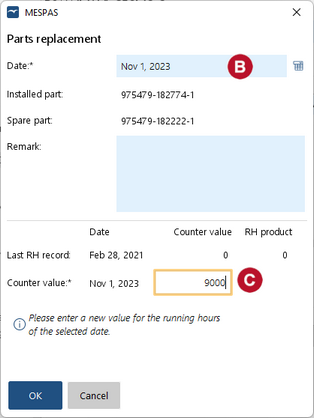
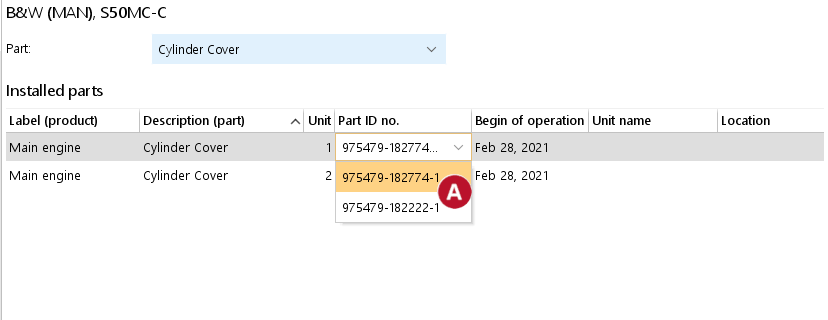
How to exchange part instances 5.Exchange an installed instance of the part with an uninstalled instance of the part by clicking an existing part number and selecting the part number to be installed from the drop-down. 6.Enter the date when the exchange is carried out. 7.Enter the running hours of the selected product at the date of the exchange. 8.Click |