•Running hours can be recorded for products.
•Running hours recording must be enabled for each product type individually.
•Running hours can be recorded in three different ways:
- on the screen Running hours
- while recording overhauls based on running hours,
- in the state variables screen.
•Running hours can be recorded for the present date or any date in the past after the commissioning date.
•They cannot be recorded for a future date.
•In case of replacement of a running hour counter with a counter that starts counting at 0, an offset RH value can be entered, so that just the displayed value has to be entered and the correct (total) RH amount is calculated.
Rules enforced by MESPAS TSM (compare with illustration below)
RULES enforced by MESPAS TSM for a new recording |
RULES enforced by MESPAS TSM for a new recording "R" for a past date with subsequent date (e.g. 1<R<2) |
|
•RULE: The date must not be before the product's commissioning date. •RULE: The increase in running hours since the previous recording date must not exceed subsequent recordings. |
•GENERAL RULE: The increase in running hours since the previous recording date must not exceed the logical limit of 24h per day + 24h per recording. •GENERAL RULE: New running hours recordings cannot be less than the corresponding previous recordings. |
|
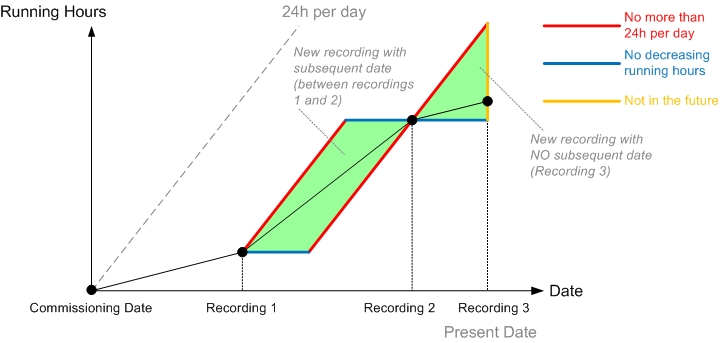
Running hours recordings rules